IPTV Beginner to Expert Guide
ABLE-IPTV
Jul 26 . 2025
A single article to walk you through the essentials of IPTV from beginner to expert — a must-read primer for newcomers to the industry.
What is IPTV
IPTV (Internet Protocol Television) is a technology that delivers TV programs and video content over IP (Internet Protocol) networks. Unlike traditional cable or satellite TV, IPTV does not rely on conventional broadcast methods — it streams over the internet.
Core features:
| Feature | Description |
|---|---|
| On-demand viewing | Supports VOD; users can pick what they want to watch at any time. |
| Live streaming | Real-time TV live broadcasts such as news, sports, etc. |
| Time-shift | Rewind, pause, fast-forward live content (similar to DVR). |
| Multi-device | Watch on TV, PC, phone, tablet, etc. |
| Internet delivery | As long as you have a network connection, you can watch — no geographic limits. |
Audience profile
The audience is mostly aged 25–50, located in Europe and the US (the prerequisite is a country with decent infrastructure — since IPTV is watched over the internet, network speed matters). At 1080P, live or VOD consumes about 800 Kbps, meaning you need at least 8 Mbps. In countries with very poor infrastructure, bandwidth cannot be guaranteed and the viewing experience suffers, which ultimately hurts conversion.
Pricing
Selling prices currently average $35–40 (cost under $10) and $50–70 (cost above $15).
Inquiry pricing
European inquiries cost around $0.5–1; US inquiries $0.7–1.5. Average conversion is 8%–20%. Inquiry pricing also depends on the ad account type (personal vs business). For the differences, see Understanding Meta Ad Assets in One Article.
Sales workflow
1. Prepare a network environment that can access the open internet See recommendations
2. Prepare a WhatsApp account (for chatting with customers) Register now
3. Prepare PayPal and complete verification (for receiving payments) Register now
4. Prepare a Facebook ad account (personal or business) Buy now
5. Buy panel accounts (sold in batches of 10). We recommend one high-end [$15+] + one low-end [$10-] Buy now
6. Prepare ad creatives (see our Facebook ad creative library) View now
7. Run ads (if you're new to ad buying, check these tutorial videos) Learn now
8. When users inquire, send them a trial and address their questions (including haggling). See chat scripts
9. After confirming order and price, send the customer your payment method (Western Union or PayPal) Payment partner
10. Once the customer pays, upgrade their trial line to an official line. The transaction is complete.
Other things you may need:
To make your ads more precise and lower cost, you may need a Facebook landing page Buy now
To boost user trust and conversion, you may need an independent site Build now
To avoid users paying multiple times (e.g. for a player), you may want to stock IBO player activation codes Become an IBO reseller
Seasonality
Generally IPTV sales don't have a sharp low/high season, but the number of sports events does correlate with order volume. In Europe, for example, conversion is much better from August to mid-June of the following year. From mid-June to August there are fewer events, and June–August is also the European/US vacation season, so order volume drops somewhat — but not drastically.
How to start selling
Before you start selling, you need an IPTV reseller panel. Panels are usually independent (each has its own reseller backend). We recommend buying one high-priced panel and one low-priced panel and selling them as a combo, so you can recommend different panels based on each customer's price sensitivity and boost conversion.
Basic sales SOP:
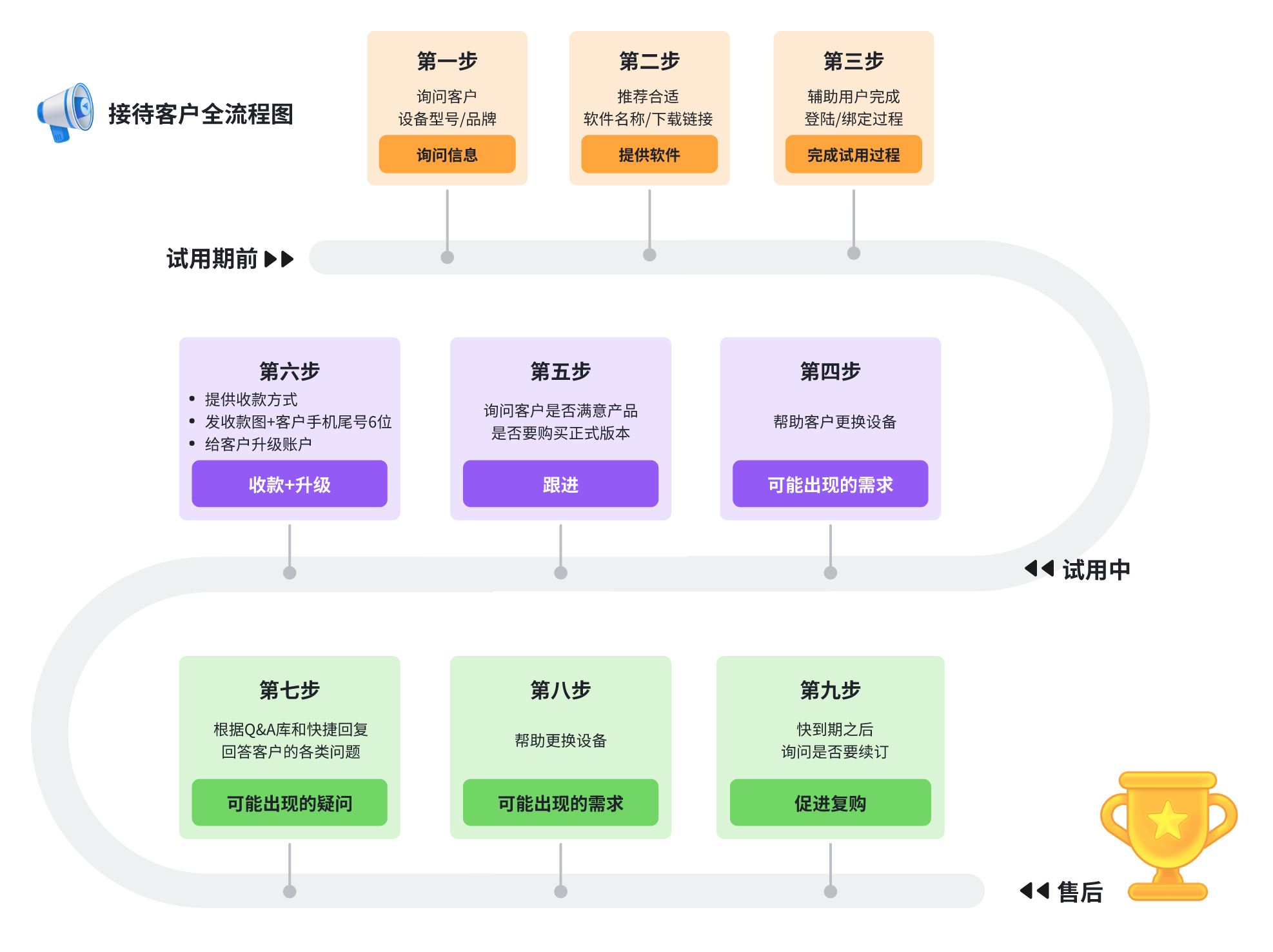
How to open a trial:
After you buy panel credits (the accounts you'll be selling), you'll typically get access to a reseller backend.
The backend shows the credits you purchased (similar to your wallet balance). Credits are only deducted when you open a trial line.
Trials are usually free but may have a daily quota (depending on the platform).
When your wallet balance is greater than 0, you can open trial accounts for customers.
How to open trial accounts on different panels: see this post
1. Trial count limits
Different panels allow different daily trial counts; some have no daily limit.
Common panel rules:
Strong/8k
Limit: 10–50 demos / per day
Notes: Higher tiers allow more trials. Lowest tier = 10/day; highest tier = 50/day.
Demos beyond the limit must be purchased separately.
Dion IPTV
Limit: 10 demos / per day
Notes: Limited to 10 trials/day. When the account balance drops below 120 credits, no more trials can be opened.
Demos beyond the limit must be purchased separately.
Lightning IPTV
Limit: Unlimited per day
Notes: No daily cap on trials, but when the balance is below 1 credit, no more trials can be opened.
Mega IPTV
Limit: 40 trials rotating
Notes: 40 trial slots total; a slot is freed when a trial line expires.
Other panels will be added gradually...
2. Credit / diamond deduction rules
2.1: After opening a trial, send it to the customer. If satisfied, they will pay.
2.2: When you receive payment, upgrade the customer's trial to an official line (or open a brand-new official line).
2.3: At this point, the corresponding panel credits will be deducted from your wallet.
2.4: The deduction depends on the subscription duration you grant:
2.4.1: For a 1-month subscription, typically 1 credit; for 1 year, 12 credits (assuming the panel rule is 1 credit = 1 month).
2.4.2: Or, for a 1-month subscription, 0.1 credit; for 1 year, 1 credit (assuming the panel rule is 1 credit = 1 year).
3. Trial line example
After opening a trial, you'll receive account info like this:
ℹ️ This trial info is expired
I-P-T-V (Android & Iphone & I-P-T-V API) Access:
Username:hrdg4611 Login account
Password:cajm4110 Login password
IPTV Url:http://zfast.cc Playback URL
Samsung/Hisense/LG Url:http://lightning-tv.com URL for Smart IPTV Pro
I-P-T-V m-3-u Access:
M3U playback URL
http://lightning-tv.com/get.php
?username=hrdg4611&password=cajm4110&type=m3u_plus&output=ts
Rayo Player Activation code: 068683478 Player activation code
How to use the trial line:
The trial line is played using a player app. Customers usually install it on their phone, tablet, PC, or TV — most commonly on TV.
Players come in free and paid versions. Paid players usually offer a 7-day free trial and deliver smoother playback.
However, if the customer is on a budget, we usually recommend a free player. There are hundreds of players on the market; customers can pick what they like.
There are about a dozen free players worth recommending.
How to download the player:
Free players:
For free players we usually recommend Smart IPTV Pro [--> Download now <--]
Paid players:
For paid players we usually recommend:
1. IBO Player Pro [--> Download now <--]
2. BOB Player [--> Download now <--]
Smart IPTV Pro setup guide:
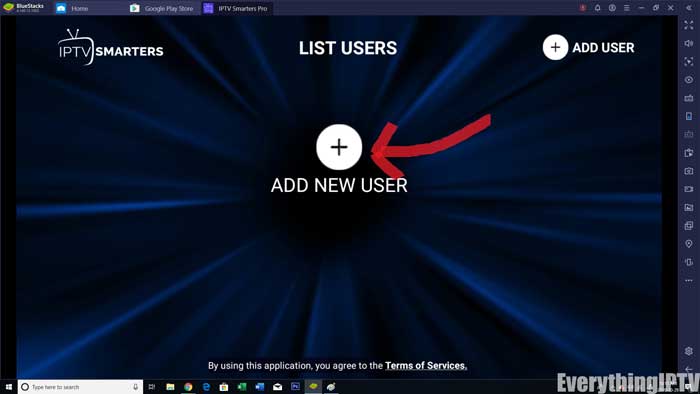
Step 1: After installing the app, open IPTV Smarters Pro and click "Add New User". As shown below.
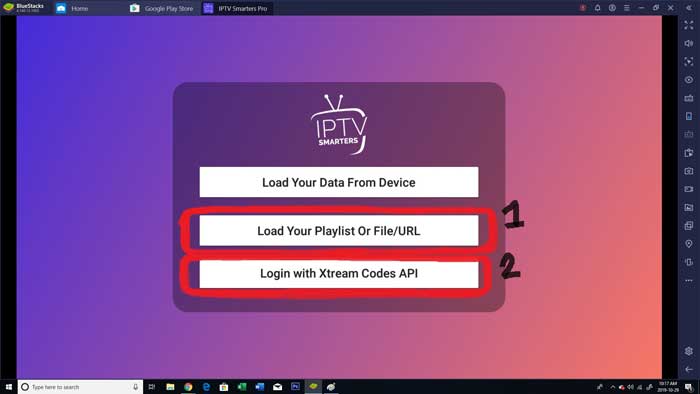
Step 2: Now you need to log in. There are two login methods.
1. Use the M3U playlist (corresponding to image 1) — you'll need the M3U URL from above.
2. Use the Xtream Codes API (image 2) with username and password (highly recommended).
Step 3: From the copied info, find the username, password and playback URL. Prefer the URL labeled "smart iptv".
The username, password and URL come from the info above. The first-row name can be anything — just make it easy to distinguish.

Step 4: After logging in, you'll be redirected to the "List Users" screen. Click the profile you just created.
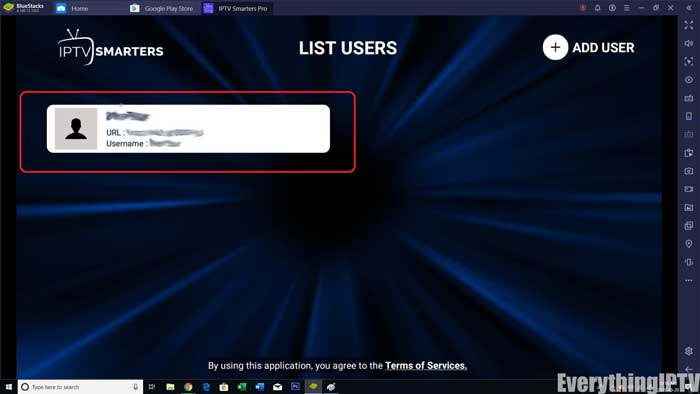
Step 5: Congratulations — you've set up and configured IPTV Smarters Pro.
Ibo Pro / BOB player setup guide:
You need to log in to the corresponding player's playlist management URL:
For BOB Player, log in here: BOBLog in now
For IBO Player Pro: IBOLog in now
For IBO player users, the customer usually sends you a screenshot with the MAC address and login password, like the one below:
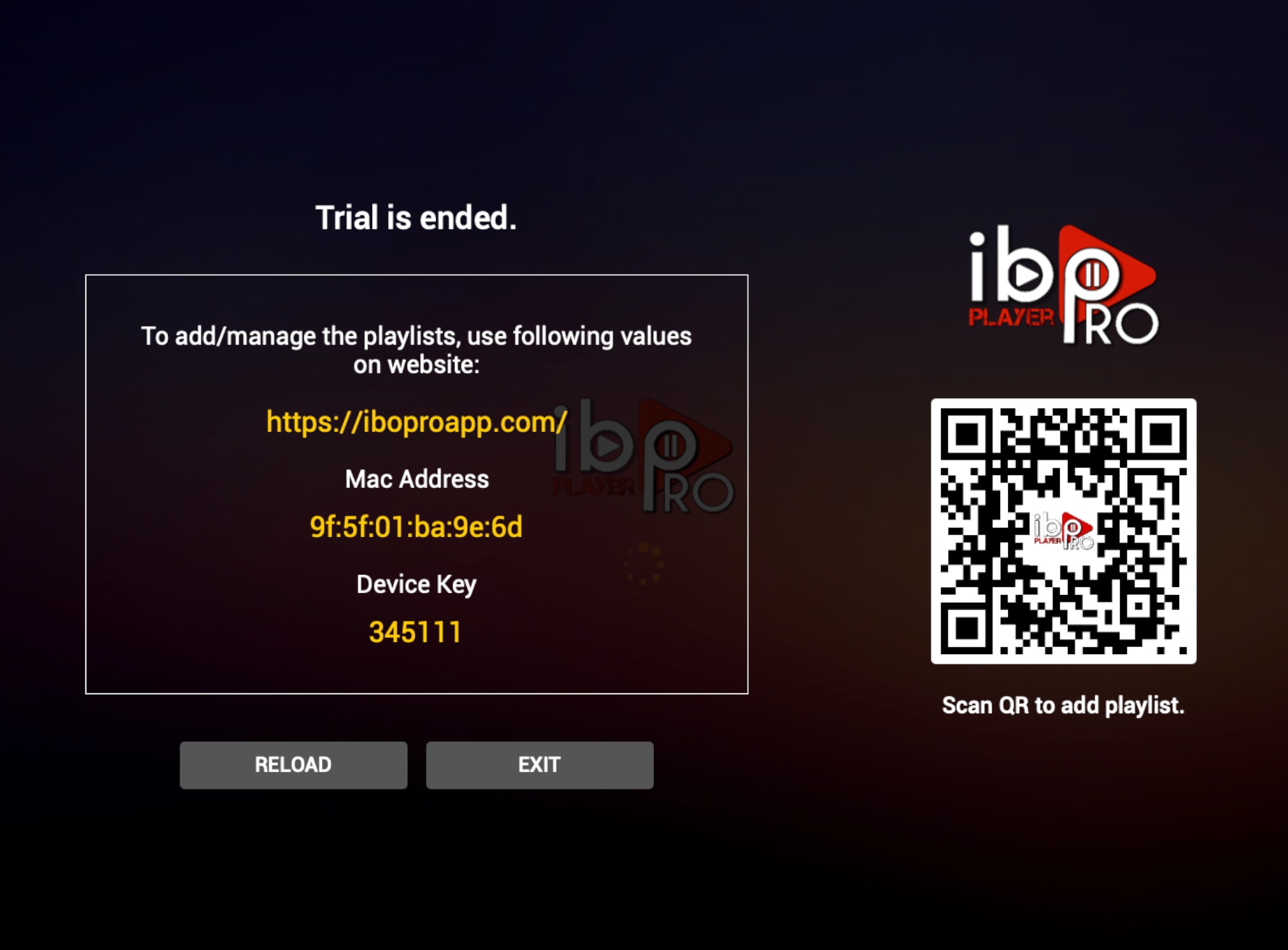
Step 1:
Some screenshots include the login URL — if so, use that URL directly.
Use the customer's MAC and Device Key to log in to the backend.

Step 2:
After logging in, add a playlist for the customer.
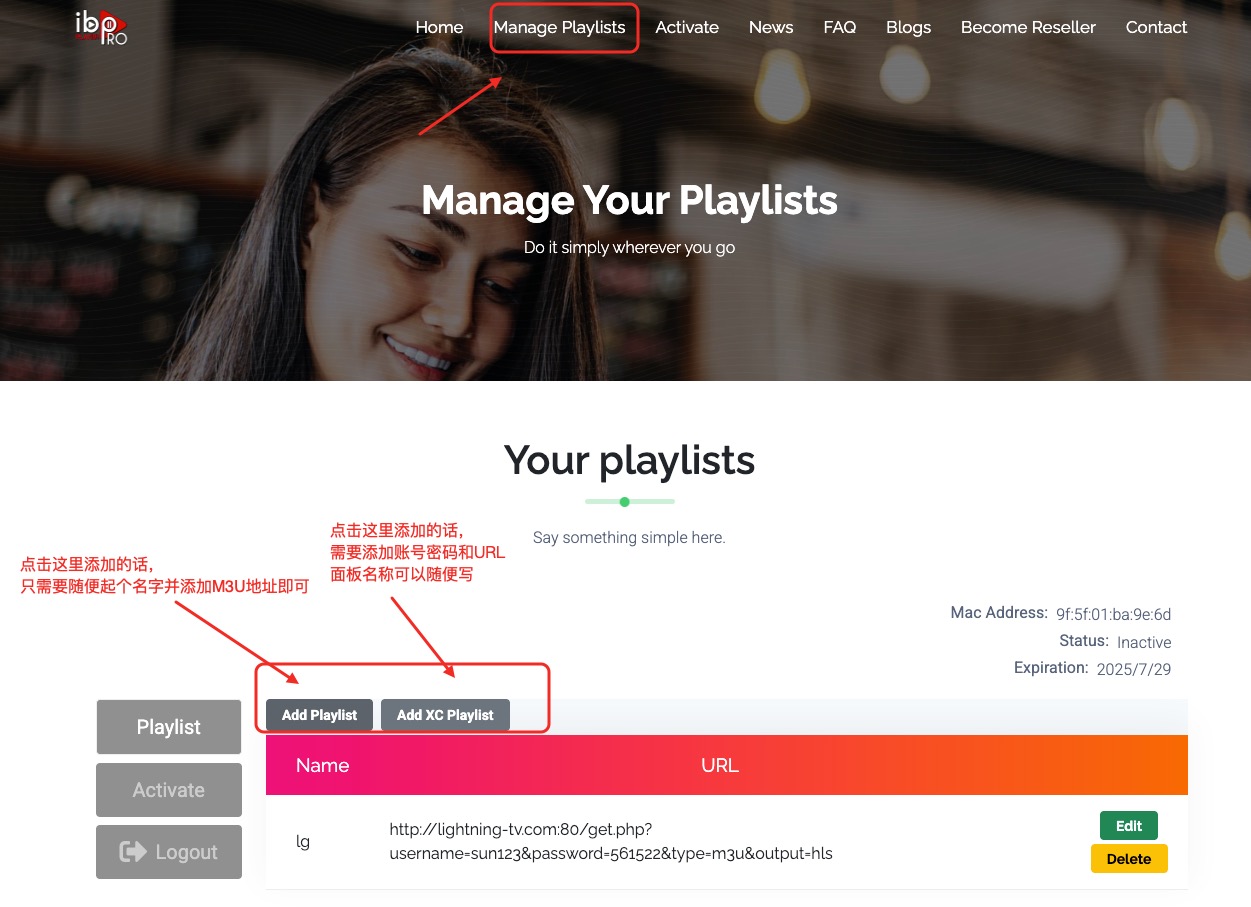
Select Add Playlist:
Click Add Playlist and name it whatever you like (usually the panel name).
Then paste theM3U URL from the info above into the input box, and confirm.
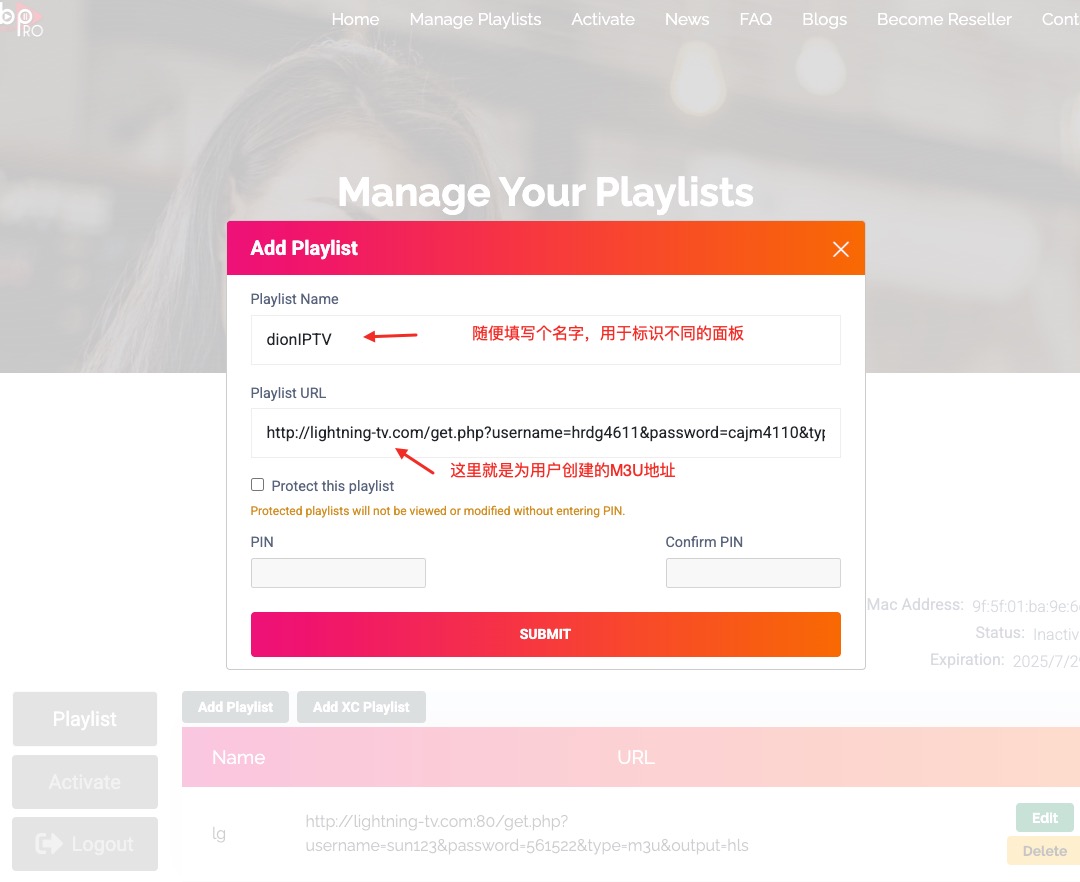
Select Add XC Playlist:
Click Add XC Playlist and name it (usually the panel name).
Then paste theusername, password and URL into the corresponding inputs and confirm.
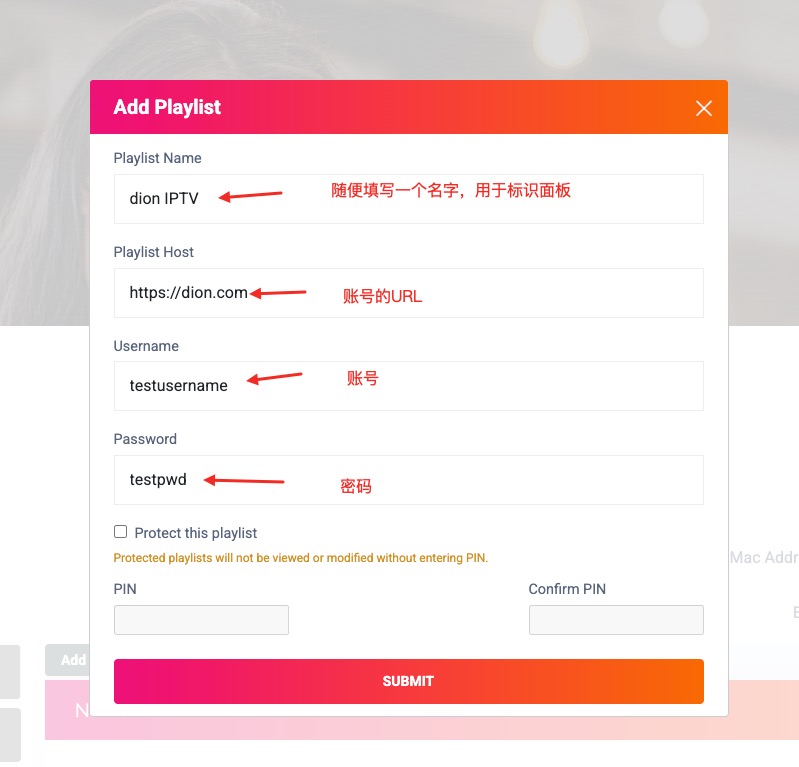
After successful addition it looks like this:
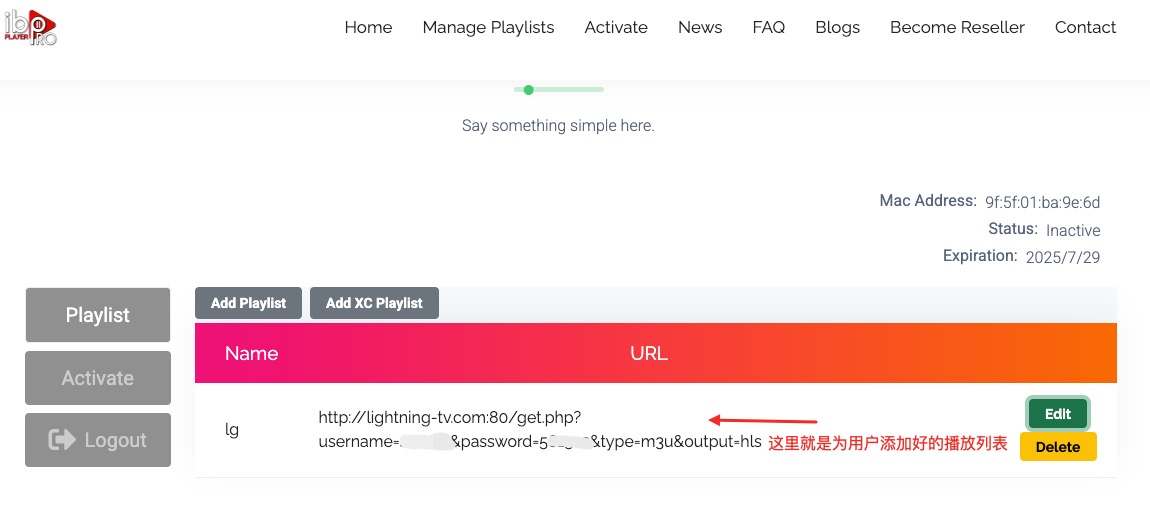
With the above steps the customer's playlist is created. The customer refreshes the playlist on their TV to see the subscription content you created.
If satisfied with the trial, you can proceed to discuss payment.
Note: although screenshots vary, as long as a MAC address appears, it's almost certainly a playlist-add type.
Just log in to the URL shown in the screenshot (or search for the player's official site and find the "Active Device" menu), and follow the same steps.
That's it.
How to pay
If the customer has a PayPal account, you can recommend PayPal for payment.
If they don't have PayPal, recommend Western Union. For how to receive via Western Union, search for the Western Union mini-program in WeChat to collect funds.
Related reading
One subscription to own it all, high definition 4K, fast loading, enjoy the good time of IPTV
No hidden consumption, all subscriptions can enjoy live TV, TV series, movies and other media, 58000+ movies, 16000+ TV channels and 17000+ TV series, watch as you like

Able IPTV
Best IPTV Provider
share:
Popular articles





Blog Directory
Related articles
Here are the articles you may need about IPTV
