IPTV Panel Setup Guide (Add Trial, Reseller, etc.)
ABLE-IPTV
Aug 09 . 2025
This article mainly covers operations common to popular IPTV panels on the market, including basics like adding trial accounts and adding resellers.
Mega IPTV:
Login information:
Login URL: https://megaott.net/
Account: the credentials provided by your reseller.
Password: the password provided by your reseller.
Add a trial account:
1: Log in to the backend.
To open a trial line for a customer:
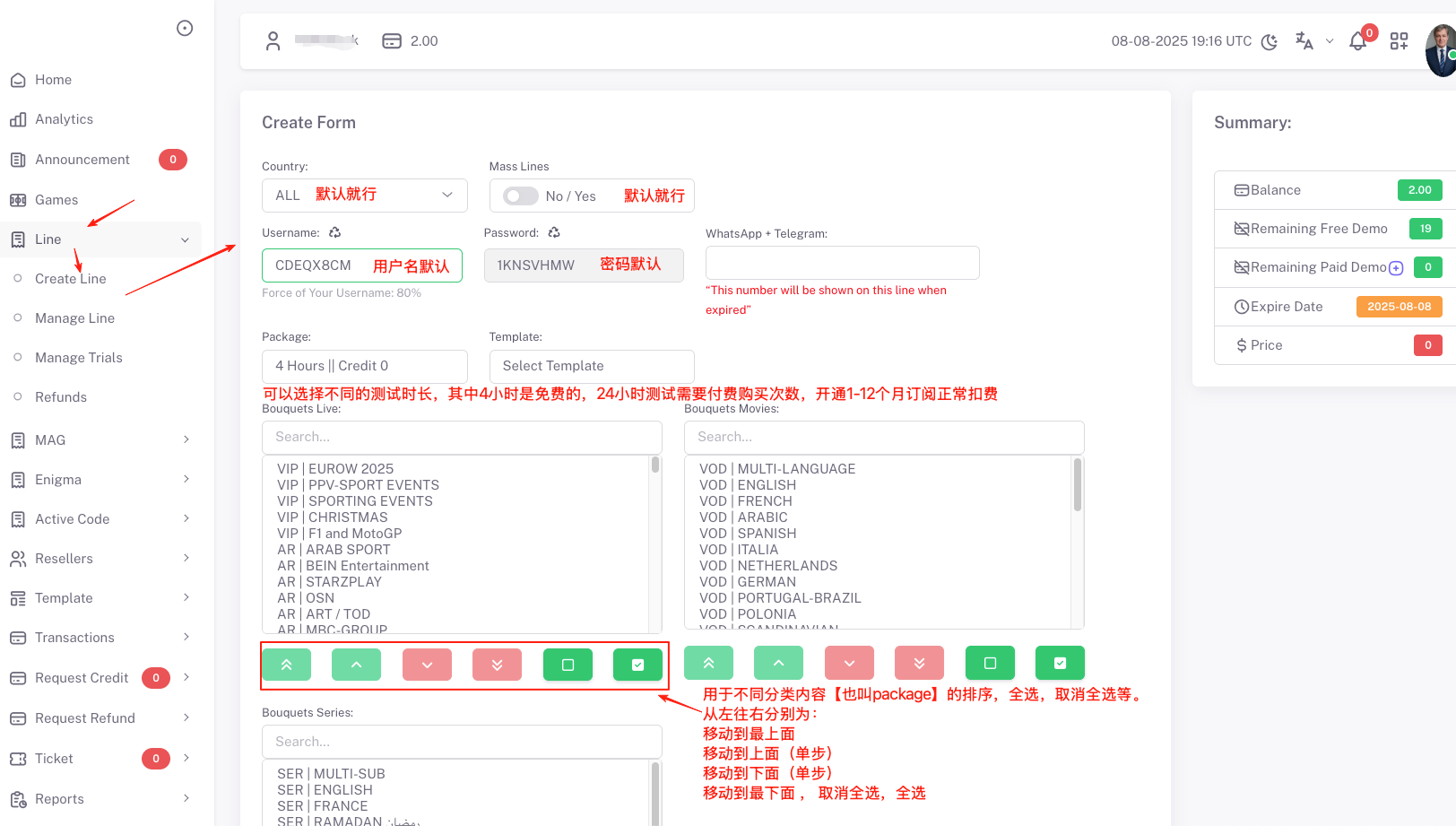
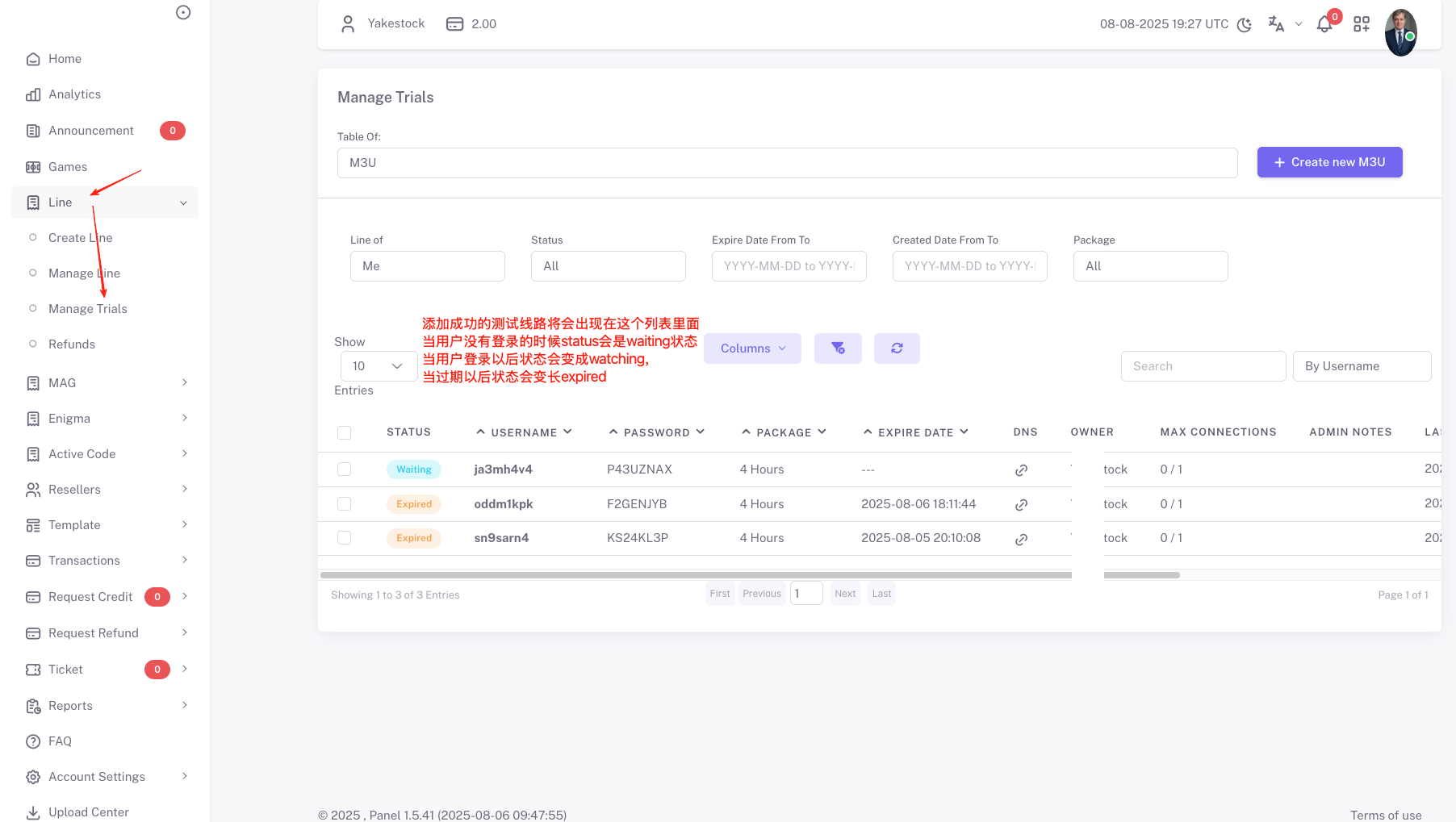
The trial line you opened will appear in the Manage Trials list.
When the user has not logged in, the line status is waiting
When the user is logged in and watching, the status is watching
When the user is not watching, the status is offline
When the user's trial expires, the status becomes expired
After the user pays successfully, click the "..." at the end of the line and find "extend".
In the popup, choose the subscription duration to open an official subscription for the user.
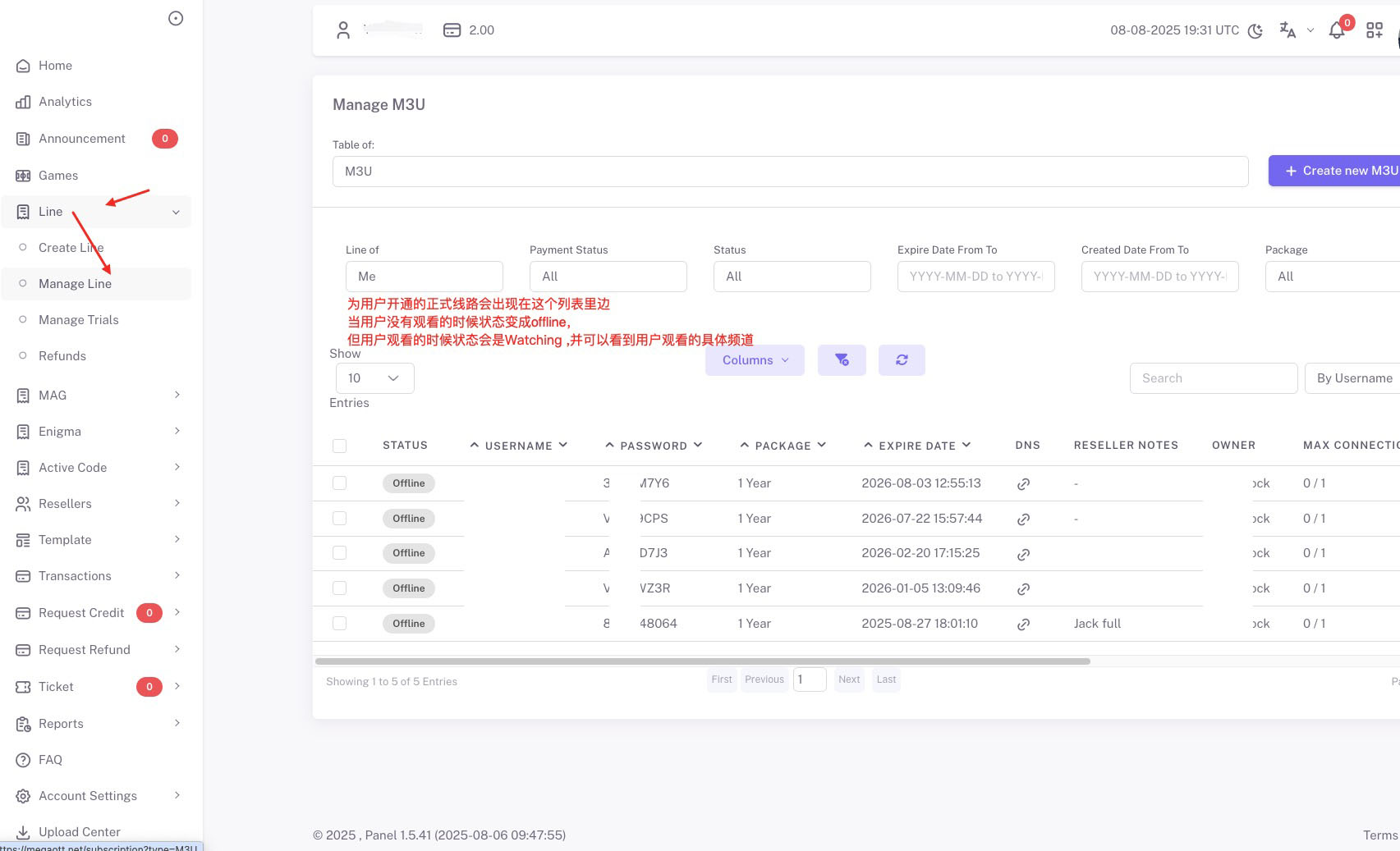
Manage official lines:
Click the "..." at the end of the line list, find "extend", and in the popup choose the subscription duration to upgrade the user's official subscription.
Click Manage Max Connections to upgrade the maximum simultaneous online connections of the user's subscription.
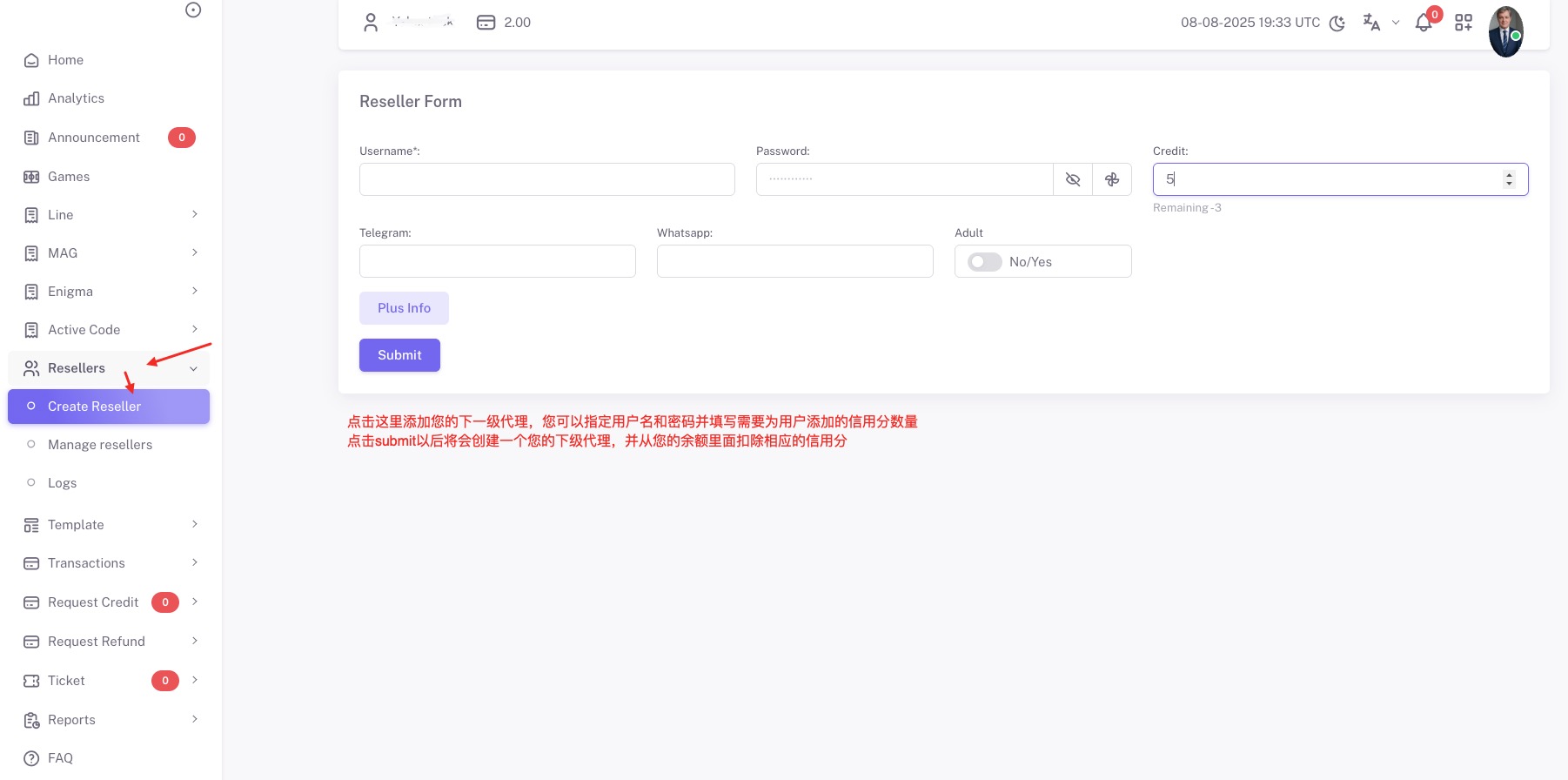
Add a sub-reseller:
Click Reseller -> Create Reseller.
Enter the username and password to create, fill in the number of credits to transfer to the sub-reseller, and click confirm.
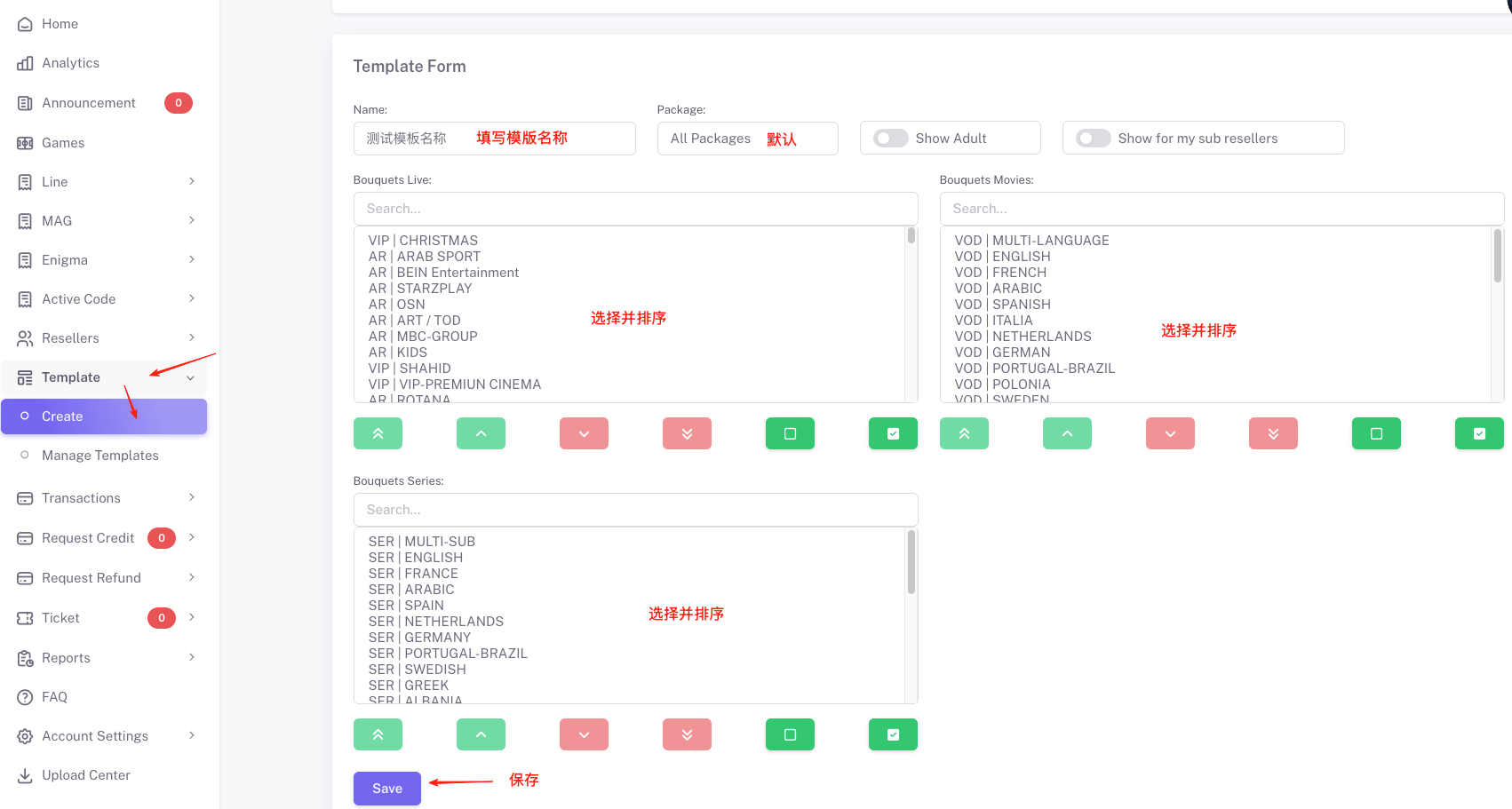
Create a bouquet template:
Because users have different needs — some want only their own country's channels and not others —
selecting everything no longer fits the user's needs. We therefore need to create customized category content, which we call a bouquet template.
Click Template -> Create, fill in the bouquet name, and tick the content packages you need. Sometimes, depending on the country, we also need to
reorder the content packages to put the channels the user needs at the top. For example, for US users, we typically pin US channels at the top for convenience.
Once the template is created, the next time you create a trial line you can pick the template you just set up, so you don't have to manually tick and reorder each time.
Mega trial line example
Below is a sample trial line. Just replace the username and password inside with the newly generated ones before sending it to your customer.
Note: there are two places that need to be replaced.
One is the username part in the message; the other is the username and password in the m3u link.
I-P-T-V (Android & Iphone & I-P-T-V API) Access:
Username:ja34v4
Password:P43UAX
DNS URL : http://iptv365.xyz
DNS URL : http://yrd1.xyz
DNS URL : http://smyeyhcs.megakomo.xyz
Samsung and LG DNS : http://smyeyhcs.ott-smart.xyz
BABKEUP URL : http://subdomain.smart-tv.xyz
BABKEUP URL : http://subdomain.ott-smart.xyz
BABKEUP URL : http://vpns365.xyz
BABKEUP URL : http://tv365.me
SAMSUNG/LG IP-TV SMARTERS DNS : http://sm365.xyz
SAMSUNG/LG IP-TV SMARTERS DNS : http://smartgr.xyz
SAMSUNG/LG IP-TV SMARTERS DNS : http://smatest.xyz
SAMSUNG/LG IP-TV SMARTERS DNS : http://smartlg.xyz
SAMSUNG/LG IP-TV SMARTERS DNS : http://smartfr.xyz
SAMSUNG/LG IP-TV SMARTERS DNS : http://smarters.live:80
Smarters Pro URL : http://smartfr.xyz
Smarters Pro URL : http://kfmiakdk.mexamo.xyz
I-P-T-V m-3-u Access:
http://smyeyhcs.ott-smart.xyz/get.php?
username=ja34v4&password=P43UAX&type=m3u_plus&output=hls
Free Trial Time: 4 Hours
Strong/8K IPTV:
Login information:
Login URL: https://my8k.me/users?t=lines#
Account: the credentials provided by your reseller.
Password: the password provided by your reseller.
Add a trial account:
1: Log in to the backend.
To open a trial line for a customer:
Click M3U -> Add New and follow the instructions below to create a trial line for the user.
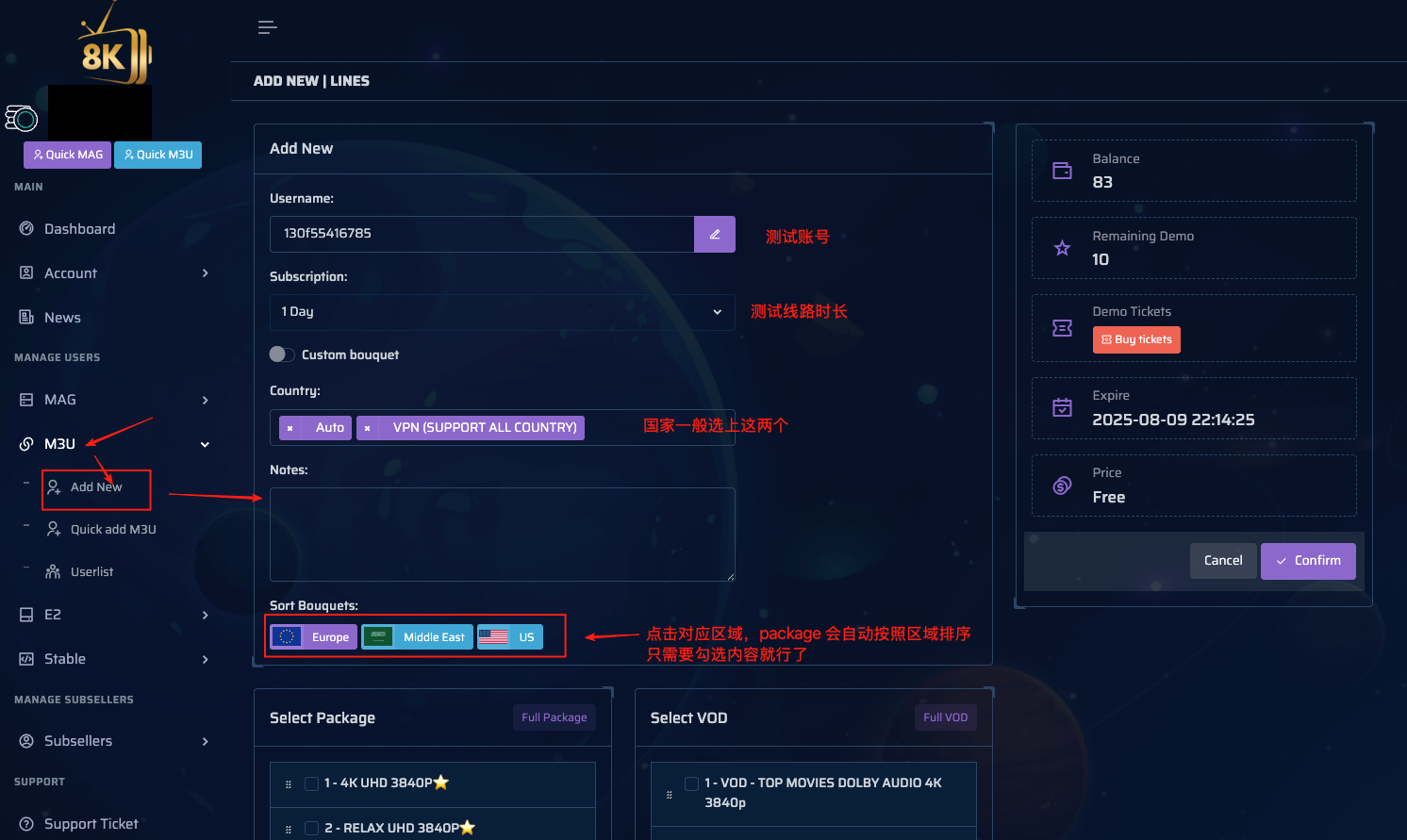
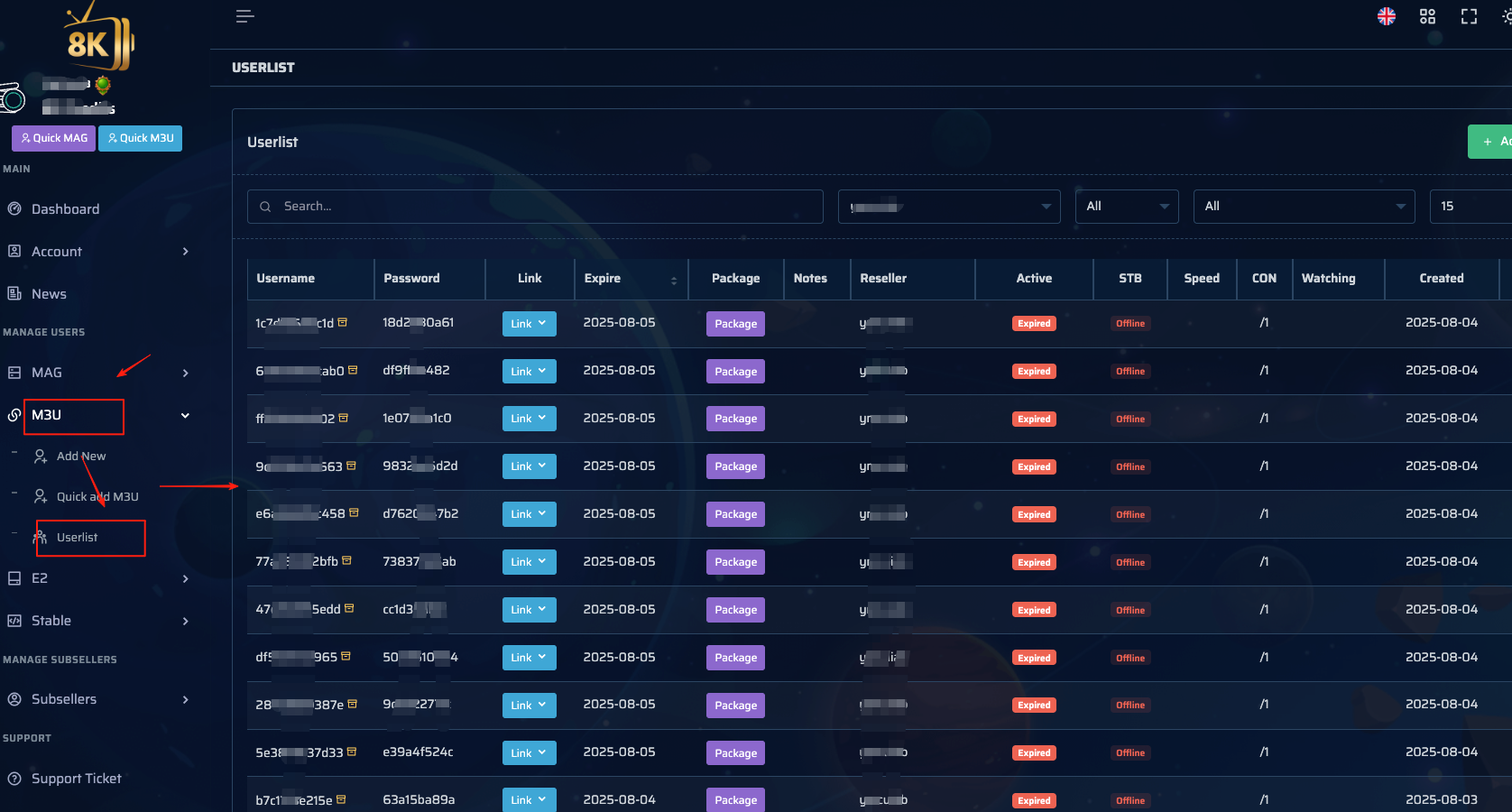
The trial line you created will appear in the list below.
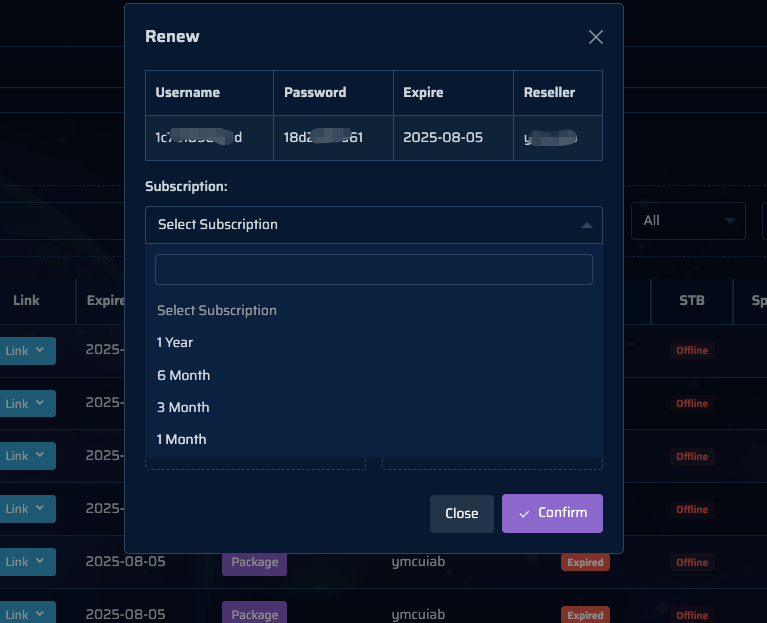
Click the gear button at the end of the line, then choose Renew from the popup menu. After clicking Renew, a dialog appears with options to upgrade the user's subscription duration.
Pick the appropriate subscription duration and confirm to complete the upgrade. The credits consumed will be deducted from your balance.
Click Subseller -> Add Subseller to add a sub-reseller.
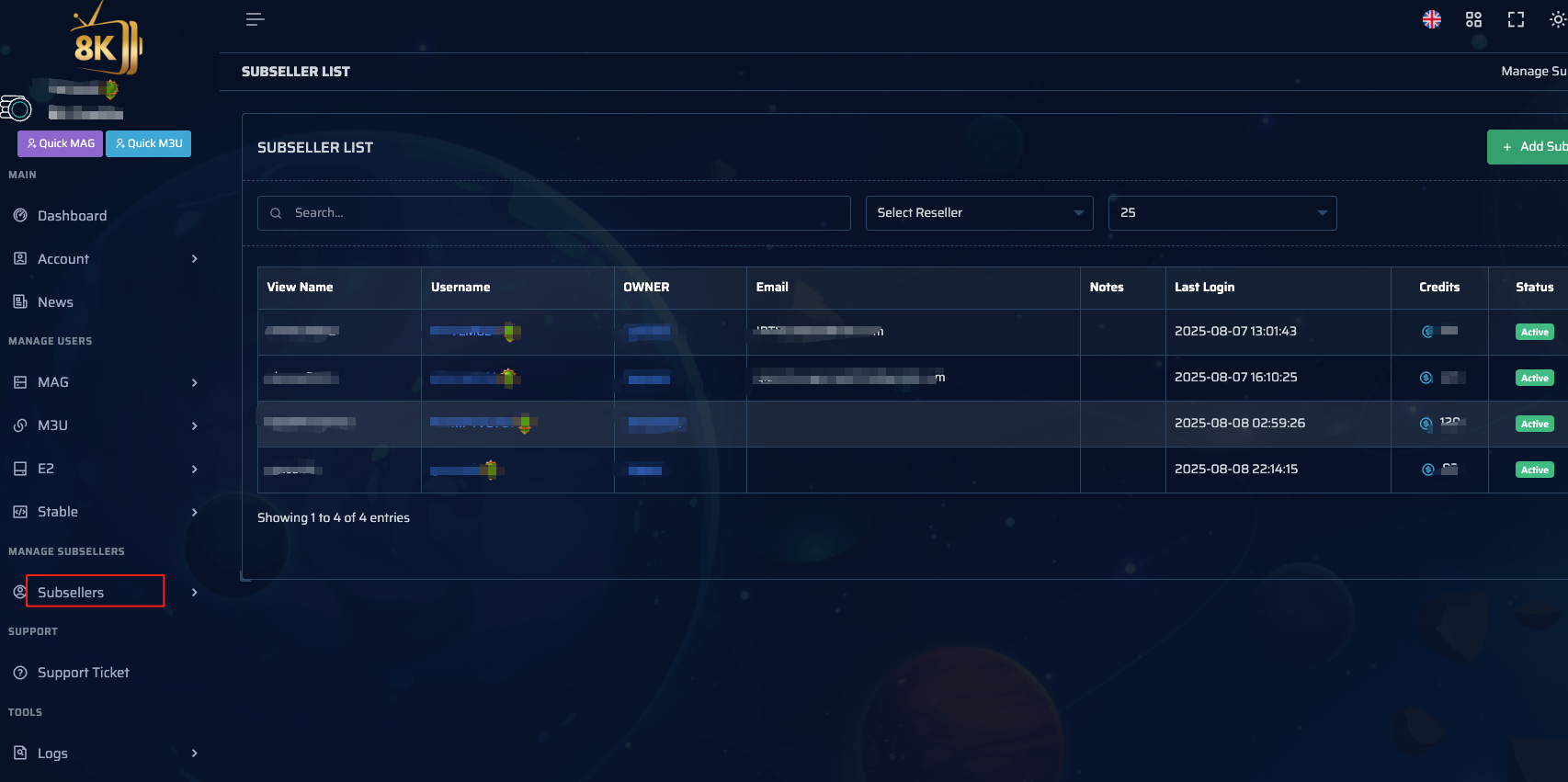
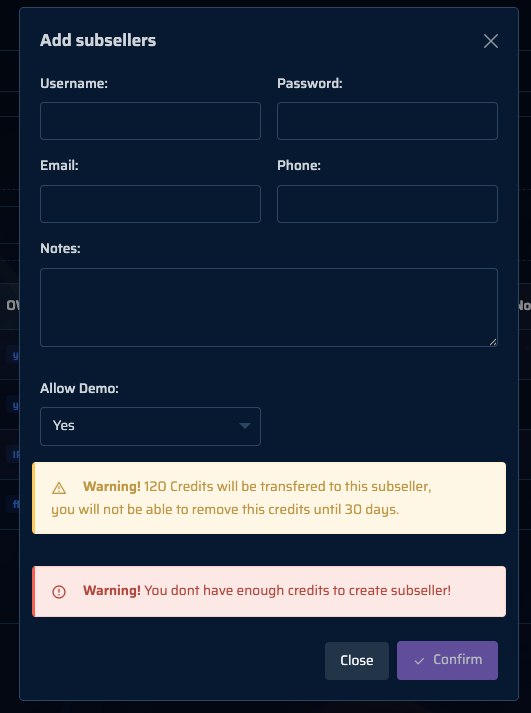
Fill in the user's basic information, tick "allow demo", and click confirm to instantly add the sub-reseller.
At the same time, 120 credits will automatically be deducted from your balance account and transferred to the reseller's account..
Create a bouquet template:
Because users have different needs — some want only their own country's channels and not others —
selecting everything no longer fits the user's needs. We therefore need to create customized category content, which we call a bouquet template.
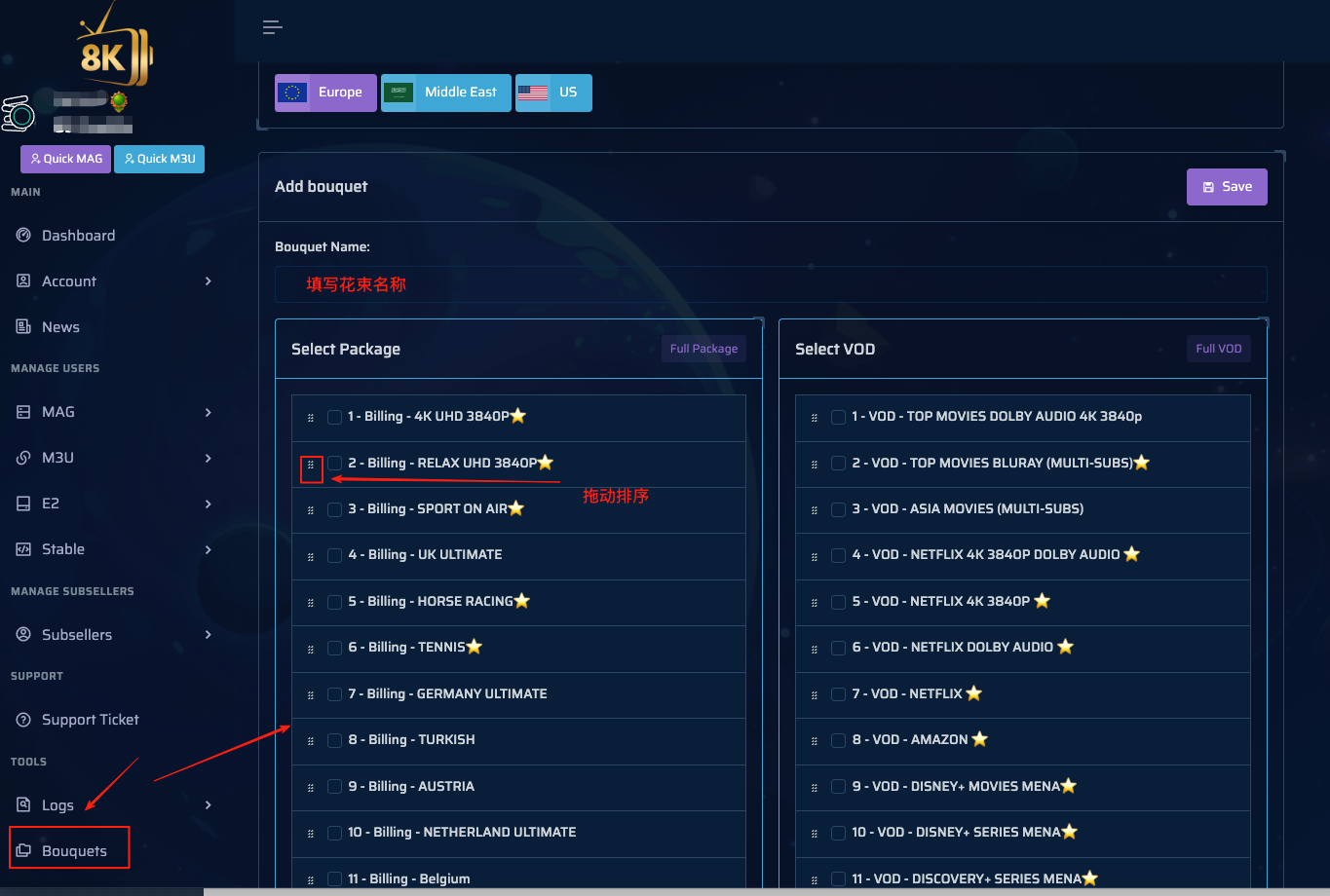
Choose Bouquets -> Add bouquets, enter a bouquet name, tick the packages you need, drag to reorder, and click Save.
Next time you create a trial, you can choose Custom bouquet to apply the preset template directly, without setting it up each time.
Strong/8K trial line example
Below is a sample trial line. Just replace the username and password inside with the newly generated ones before sending it to your customer.
Note: there are two places that need to be replaced.
One is the username part in the message; the other is the username and password in the m3u link.
I-P-T-V (Android & Iphone & I-P-T-V API) Access:
Username:e7dvgkod
Password:irsoy23e

URL : http://ok4k.me
URL : http://hi-ott.me
URL : http://m3u.zen-ott.me
URL : http://m3u.best-smarter.me
IPTV Url : http://test61713.cdn-akm.me:80
Smarters Pro  URL : http://cf.hi-cdn.me
Smarters Pro  URL : http://cf.hi-ott.me
Smarters Pro  URL : http://cf.hi-max.me
Smarters Pro  URL : http://cf.cdn-amz1.me


I-P-T-V m-3-u Access:
http://cf.cdn-amz1.me/get.php?
username=e7dvgkod&password=irsoy23e&type=m3u_plus&output=hls

Free Trial Time: 24 Hours
Related reading
One subscription to own it all, high definition 4K, fast loading, enjoy the good time of IPTV
No hidden consumption, all subscriptions can enjoy live TV, TV series, movies and other media, 58000+ movies, 16000+ TV channels and 17000+ TV series, watch as you like

Able IPTV
Best IPTV Provider
share:
Popular articles






Blog Directory
Related articles
Here are the articles you may need about IPTV
